
Think You Know NumPy? Try Solving These 5 Challenges

Break into Generative AI & LLMs (Go from Novice to Pro)
Hands down the best course if you are serious about learning about generative AI and large language models. Everything you need to pass interviews and thrive in your role as an AI engineer is covered. Here is what you get:
90+ Lessons, 60+ Hours
Real-world Projects (Build your own AI apps)
Tools: OpenAI, LangChain, LlamaIndex
70,000+ Developer Community
Start here: Click here to access the course

Introduction
All important things come in threes. The trio of pandas, NumPy, and Matplotlib is often considered the "holy trinity" of data analysis in Python. The next most important library after pandas for data analysis is NumPy. It is the fundamental package for scientific computing in Python and serves as the backbone for a vast ecosystem of other libraries, including pandas itself. Basically, pandas piggybacks on NumPy.
Working with NumPy opens the door to powerful array operations and data manipulations in Python. In this article, we’ll go through several challenges that explore creating arrays, performing operations, generating visualizations, and extracting insights. All essential skills for data analysis. You can find these challenges in the book 50 Days of Data Analysis with Python: The Ultimate Challenge Book for Beginners.
Creating Arrays of Random Integers
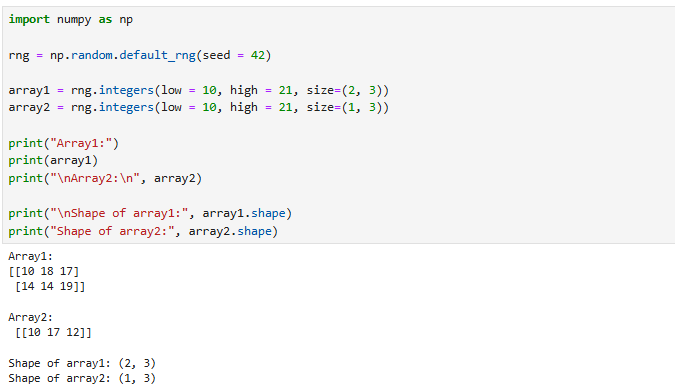
1. Create two arrays of random integers between 10 and 20. The shape of the array must be (2, 3) for the first array and (1, 3) for the second array. Check the shape of the arrays. Ensure that the results are reproducible.
To answer this question, we create a random number generator (rng) with a fixed seed (42). This seed ensures that the generated numbers are reproducible. The same random numbers are generated every time you run the code. We’ll create two arrays of random integers between 10 and 20. The first array has a shape of (2, 3). The second array has a shape of (1, 3). Here is the code below:
Adding the Arrays
2. Write a code to add the two arrays you just created in question 1. Check the shape of the resulting array. Explain why the resulting shape is that of the bigger array from the two arrays created in question 1.
Adding arrays lets you combine two sets of measurements element by element. For example, one array stores sales from Store A, another stores sales from Store B. Adding them gives total sales across both stores. Many models in statistics and machine learning involve vector and matrix addition. In linear regression, updating parameters often involves adding (or subtracting) arrays of numbers during optimization steps.
Let's add the two arrays:

About the shape, NumPy broadcasts the smaller array (arr2) across the rows of the larger array (arr1). Therefore, the result has shape (2, 3). The same as the bigger array.
Performing a Dot Operation
3. Write another code to perform a dot operation on the arrays.
Before jumping into the code, it’s important to understand what the dot product is. A dot operation (also called the dot product or inner product) is a mathematical operation that multiplies two arrays in a specific way. The result can be a scalar, a vector, or even a matrix, depending on the shapes of the input arrays. In NumPy, the dot operation is performed using the numpy.dot() function. For the operation to work, the inner dimensions of the arrays must match.
Our two arrays have shapes (2, 3) and (1, 3).

To perform the dot product, we need the second array to have shape (3, 1).
By transposing the smaller array (arr2), we change its shape from (1, 3) to (3, 1).
Now the multiplication works:

The resulting array has shape (2, 1). See below:

Visualizing Distributions with Histograms
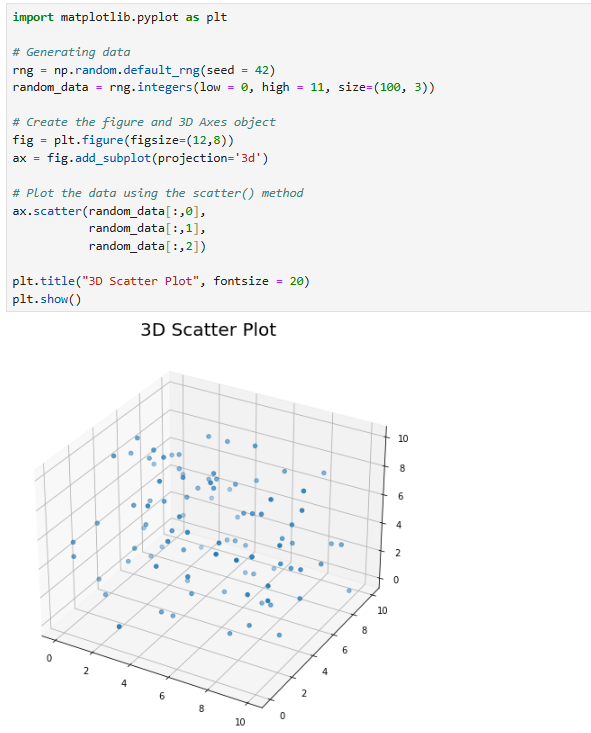
4. Using NumPy, create a 3-dimensional array of 100 random floats between 0 and 1. Use the array to create a 3D scatterplot of the data. Ensure that your results are reproducible.
A 3D scatterplot is a way of visualizing data that has three continuous variables at the same time. While a 2D scatterplot shows relationships between two variables (x and y), a 3D scatterplot adds a third dimension (z), giving you more context about the structure of your data. There are many benefits of scatter plots, including:
Detecting Clusters and Groupings: Points in 3D space may form clusters that correspond to categories in your data. For example, in customer segmentation, you might plot income, age, and spending score and immediately spot distinct groups of customers.
Spotting Outliers: Outliers stand out more clearly in 3D when they don’t align with the main data cloud. This helps in cleaning data or identifying unusual behaviors.
To answer this question, first, we will generate data using NumPy. Once the data is generated, we use the Matplotlib library to create the plot. See below:
Flattening and Filtering a List
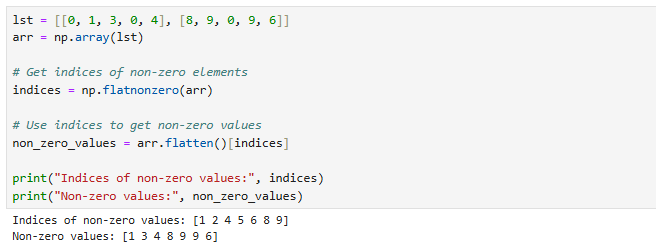
5. Create an array from this list: lst =[[0, 1, 3, 0, 4], [8, 9, 0, 9, 6]]. Write code to flatten the array (list) and return all non-zero numbers and their indices.
On the surface, this question (flattening a list and removing zeros) might look too simple, but for a data analyst, it’s actually very practical. Real-world data often comes in nested lists, irregular structures, or with lots of missing/zero values. Flattening and filtering are essential steps to turn messy data into a clean, usable format. For example, sometimes, zeros indicate "absence" (e.g., no purchase, no event, no rating), and non-zero values indicate actual activity. Flattening and filtering help you isolate active features of interest.
Let's now answer the question. To answer the question, we use the NumPy flatnonzero() function. When we call np.flatnonzero(arr), we get the indices of non-zero elements in the flattened array. Once we have these indices, we use them to index into arr.flatten() and retrieve the actual non-zero numbers.
Wrap-Up
We could keep going, but all good things must come to an end, and that includes our NumPy challenges. Taking on these challenges is the best way to truly learn the library. If you're working with data, you simply cannot afford to ignore NumPy.
If you're just getting started, try the challenges on Days 5 through 9 of the book 50 Days of Data Analysis with Python: The Ultimate Challenge Book for Beginners. Remember: you don't just read NumPy; you practice it. Thanks for reading.
Data Analysis with Python: Practice, Practice, Practice [30% OFF].
The purpose of this book is to ensure that you develop data analysis skills with Python by tackling challenges. By the end, you should be confident enough to take on any data analysis project with Python. Start your 50-day journey with "50 Days of Data Analysis with Python: The Ultimate Challenge Book for Beginners."
Other Resources
Want to learn Python fundamentals the easy way? Check out Master Python Fundamentals—The Ultimate Python Course for Beginners
Challenge yourself with Python challenges. Check out 50 Days of Python: A Challenge a Day.
As a data analyst, I love how these challenges highlight that NumPy isn’t just about arrays, but about building the muscle memory for real-world data tasks,
Whether it’s broadcasting, dot products, or filtering noise out of messy lists, these are the exact skills we use when wrangling sales data, cleaning survey responses, or preparing features for machine learning models;
Curious though, which of these five challenges do you think beginners struggle with the most before it “clicks”?
Great breakdown, love how you tie real coding challenges to practical data analysis. NumPy really is the backbone of so much in Python.