
SQL Essentials: 50 Days to Learn, Practice, and Build Confidence

If you’ve been following my work for a while, you already know one thing about me: I love breaking big, overwhelming topics into small, manageable daily challenges. It’s the whole reason my 50 Days format exists. Most people don’t struggle because SQL is hard. They struggle because they try to learn too much at once, or they get stuck wondering whether they’re “doing it right.”
So when I started putting together SQL Essentials for Data Analysis: A 50-Day Hands-on Challenge Book (Go From Beginner to Pro), I knew I didn’t want to write another textbook-style guide. I wanted a book that feels like I’m sitting next to you, walking you through one concept a day, giving you just enough practice to build confidence without burnout. Something you can spend 20–30 minutes with each day and actually make progress.
SQL Essentials for Data Analysis is Now Available
SQL Essentials for Data Analysis: A 50-Day Hands-on Challenge Book (Go From Beginner to Pro). Gumroad 35% OFF.
That’s why the 50-day structure works so well. It creates momentum. It creates rhythm. And most importantly, it creates consistency. It removes the guesswork. It gives you the beginning and the end. And it gives beginners the clarity they need to develop a real SQL foundation without feeling overwhelmed.
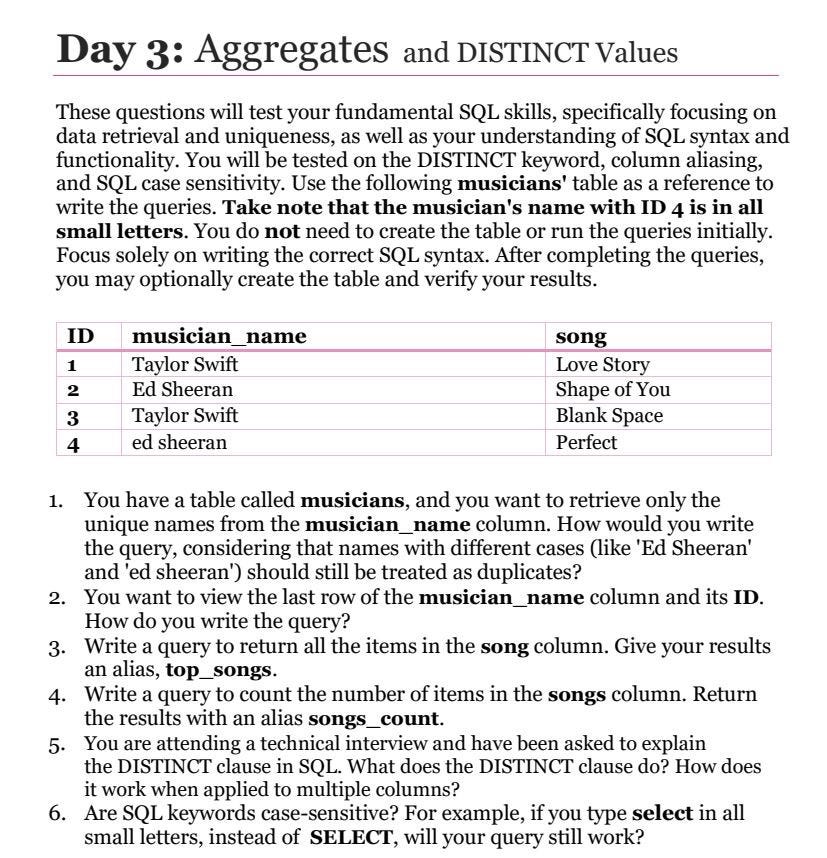
Today, we’re looking at Day 3: Aggregates and DISTINCT Values, a day where we dive into the kind of questions that show up in real interviews and real data work. I’m going to walk you through the questions just as I do in the book. It will be light, friendly, practical, and beginner-friendly.
Let’s jump in.
1. You have a table called musicians, and you want to retrieve only the unique names from the musician_name column. How would you write the query, considering that names with different cases (like ‘Ed Sheeran’ and ‘ed sheeran’) should still be treated as duplicates?
The first question exposes one of the most common beginner mistakes. Many learners do not take into consideration that the DISTINCT clause is case-sensitive in some databases (meaning it treats text values differently depending on case), including SQLite.
In SQLite, the default collation rules for the DISTINCT clause treat ‘Ed Sheeran’ and ‘ed sheeran’ as unique values because of the different cases. To fix this, we need to standardize the case before applying DISTINCT. One simple method is to use the LOWER() or UPPER() functions on the musician_name column before applying DISTINCT. See below:

Alternatively, we can use the UPPER() function:

Either way works as long as you’re consistent.
Alternatively, SQLite provides a collation rule called NOCASE, which tells the database to ignore case when comparing text values. Here’s how you can use it:

Why Case Sensitivity Matters for Writing Resilient, Real-World SQL
When writing production queries, especially in analytics, you want your code to behave consistently across environments, teams, and datasets. By using LOWER() or UPPER() to normalize text case, you ensure that your queries produce consistent results, regardless of the database or data variations.
2. You want to view the last row of the musician_name column and its ID. How do you write the query?
This question is straightforward if you understand the ORDER BY and LIMIT clauses. To view the last row in a table (based on ID), here is a clean and common approach:

Sorting in descending order puts the highest ID first, and LIMIT 1 grabs it. This is a pattern you’ll use constantly when retrieving the latest records.
3. Write a query to return all the items in the song column. Give your results an alias, top_songs.
This question is very straightforward. All you need to do is pass the song column to the SELECT clause. However, it introduces a very important concept in SQL: aliases.
Aliases matter because they make your queries easier to read and understand. When you write code, you’re not just writing for the database; you’re writing for your future self and for others who will read your work. A good alias adds meaning and clarity, making your queries easier to maintain. Here is the solution:

Simple, readable, and clean.
You’ll see aliases all over real-world SQL. In fact, sometimes they’re not optional. For example, when you work with aggregate functions, case expressions, or subqueries, you usually must give your results a name. Otherwise, your columns end up with auto-generated names that make no sense.
4. Write a query to count the number of items in the songs column. Return the results with an alias songs_count.
Anytime you want to count rows, use COUNT(). It’s important to note that when you pass a column to COUNT(), it counts all non-NULL values. In the example below, we also add an alias so your results don’t appear with a generic column name:

If you wanted to count all rows regardless of whether song is NULL, you could use COUNT(*), but that’s a topic for a later day in the book.
5. You are attending a technical interview and have been asked to explain the DISTINCT clause in SQL. What does the DISTINCT clause do? How does it work when applied to multiple columns?
DISTINCT removes duplicate rows from your result set. When applied to one column, it returns unique values from that column. When applied to multiple columns, SQL checks the combination of those columns and returns only unique combinations.
The query below will remove duplicates from the musician_name column.

The query below checks both columns together. If the pair appears more than once, duplicates are removed.

6. Are SQL keywords case-sensitive?
This is the question every beginner wonders about but rarely asks. No, SQL keywords are not case-sensitive like in Python.
The following are all valid:

So yes, your lowercase select will work just fine. However, most developers write keywords in uppercase because it is a recommended style. Writing SQL keywords in uppercase is not a rule, but it’s one of those habits that separates beginners from professionals. SQL is a declarative language. When you quickly scan a query, your brain wants to distinguish between what the database should do (commands) and what data it’s acting on. Uppercasing commands like SELECT, FROM, WHERE, GROUP BY, and ORDER BY makes them immediately stand out. It’s visual structure. Your eyes know what is a keyword and what is a column or table name.
In short, we uppercase SQL keywords for clarity, readability, professionalism, and long-term maintainability.
Wrap-Up
Well, that’s a wrap for day 3. As you progress, the challenges will get more demanding but not overwhelming. Every day in this book is designed to be approachable and actionable. You’ll get:
A small concept to learn without feeling overwhelmed
A practical example to see it in action
A real-world challenge to test your understanding
A short explanation that keeps things simple
By the time you reach Day 50, your SQL confidence won’t come from reading; it will come from repetition, problem-solving, and the momentum of taking one small step every day.
If you’ve ever wanted to finally feel comfortable with SQL, this 50-day structure gives you exactly what you’ve been missing: a simple, predictable system that guides you forward, one day at a time.