
Recursive Queries in SQL: How Well Do You Really Understand Them?

SQL Essentials for Data Analysis is Now Available
Learn the #1 skill in data. If you’re tired of hopping between tutorials and want a clear, guided roadmap, this is the step that finally gets you unstuck. You can grab your copy today and start the 50-day journey at a reduced price. Grab it here: Gumroad 35% OFF.
50 Days of Data Analysis with Python: The Ultimate Challenge Book for Beginners: Learn data analysis (50% BLACK Friday OFF).
50 Days of Python: A Challenge a Day: Learn Python through daily challenges (50% BLACK Friday OFF).
Introduction
One thing I’ve noticed about SQL is that certain topics are often overlooked by learners. One of these is recursive queries. Some argue that real-life scenarios rarely require writing them, which is understandable. Recursive queries can be expensive to execute and tricky to optimize.
However, understanding recursive queries is valuable, even if you never have to write one from scratch. They provide a powerful way to work with hierarchical data, and as a data analyst or engineer, you don’t just write your own queries; you also have to read, understand, and optimize other people’s code. If that code includes a recursive query, you need to be prepared. They say, “Stay ready so you don’t have to get ready.”
In this article, we’ll take a deep dive into recursive queries. We will break down how they work, when to use them, and how to write them effectively. Let’s get started!
Recursive Queries
A recursive query, as the name suggests, is a query that repeatedly executes itself until a specific task is completed. Think of it like a snowball rolling down a hill, gathering more data with each step until it reaches the base.
Almost all recursive queries include the following key components: First is the CTE (Common Table Expression) Declaration. Recursive queries are typically written using a recursive clause, followed by the recursive CTE definition, making them easier to read and structure. Next is the base case, which defines the initial result set that starts the recursion. It represents the lowest level of data, such as root nodes in a hierarchy or the first step in an accumulation process.
The recursive member is the part of the query that references itself, allowing it to iterate over the data until a stopping condition is met. This step typically joins the previous iteration’s results with the main table, expanding the dataset at each step. To prevent infinite loops, a termination condition must be set in a recursive query. It ensures that recursion stops when no new rows are added to the result set.
Recursive queries rely on the union operator, which combines the base case and recursive step. This operator is the UNION ALL operator. This operator is preferred over UNION because it retains duplicate values, making it more efficient. UNION, on the other hand, performs duplicate checks, which add unnecessary computational overhead, especially for large datasets.
Let’s look at an example of a recursive query that includes all five components.
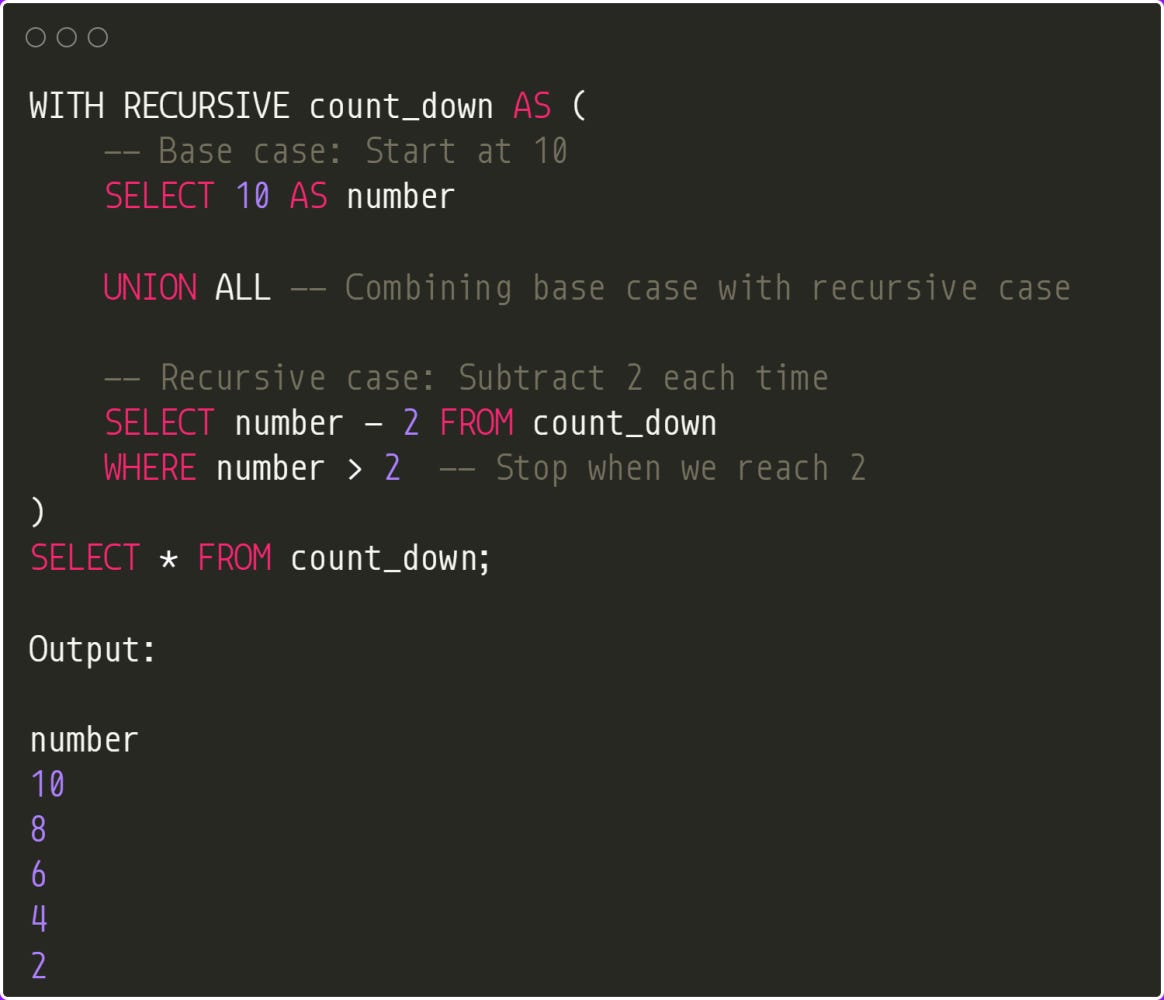
Here, to create a recursive query, we use a CTE (Common Table Expression) with the RECURSIVE keyword. In this example, we start with a base case, which begins at 10. The recursive case repeatedly subtracts 2 from the previous result, continuing until it reaches 2.
The base case and recursive case are combined using the UNION ALL operator. The recursion stops when the termination condition, defined in the WHERE clause (WHERE number > 2), is met.
If you’re familiar with Python, this is similar to a while loop with a break condition. Without a stopping condition, a recursive query would run indefinitely. You can see that once the number reaches 2, it becomes the last value in the result set.
Let’s look at another example. Let’s say we have the following data:
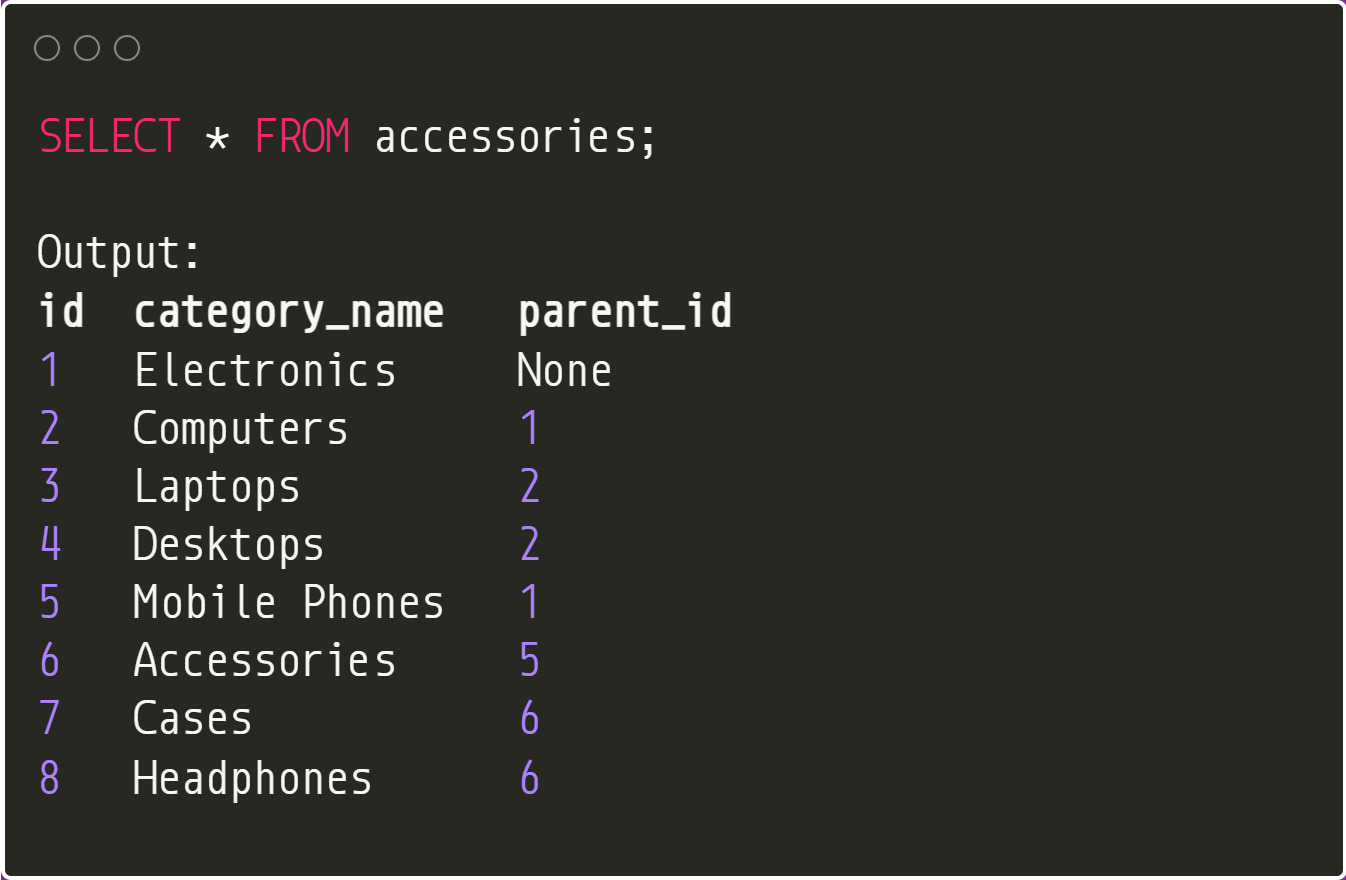
This is the hierarchical data that recursive queries are popular for. We have a table called accessories. The parent_id column establishes a parent-child relationship among categories. For instance, “Electronics” is a top-level category (parent_id = None), “Computers” falls under “Electronics” (parent_id = 1), and “Laptops” and “Desktops” are subcategories of “Computers” (parent_id = 2). To construct a hierarchical representation of categories, we use recursive Common Table Expressions (CTEs) below:
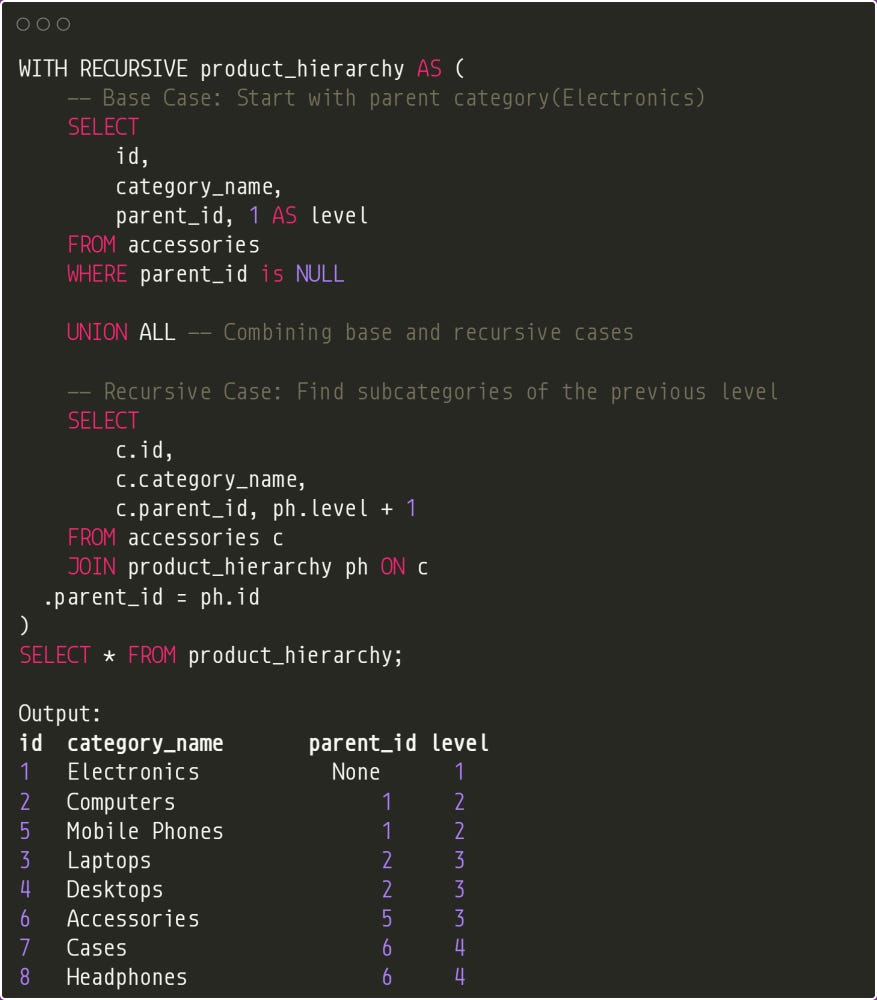
Let’s break down what is happening here. First, in the CTE, we set the base case by selecting the root category, which is the “Electronics” (WHERE parent_id is NULL). The base case selects “Electronics” (id = 1, parent_id = NULL, level = 1) because its parent_id is NULL. So, product_hierarchy results after base case:

Next, we have the recursive case. This will repeatedly find subcategories of the previously found categories until no more subcategories exist. Notice that for this step, we perform an INNER JOIN operation with the accessories table. The first recursive step looks for rows in the accessories table where parent_id matches ph.id (i.e., parent_id = 1, since Electronics has ph.id = 1). From the accessories table, it finds 2 matches:
Computers (id = 2, parent_id = 1)
Mobile Phones (id = 5, parent_id = 1)
It joins these with product_hierarchy and sets the level to ph.level + 1 (1 + 1 = 2). Giving computers and mobile phones a level of 2 (subcategories of Electronics). Here is how product_hierarchy looks after this step:
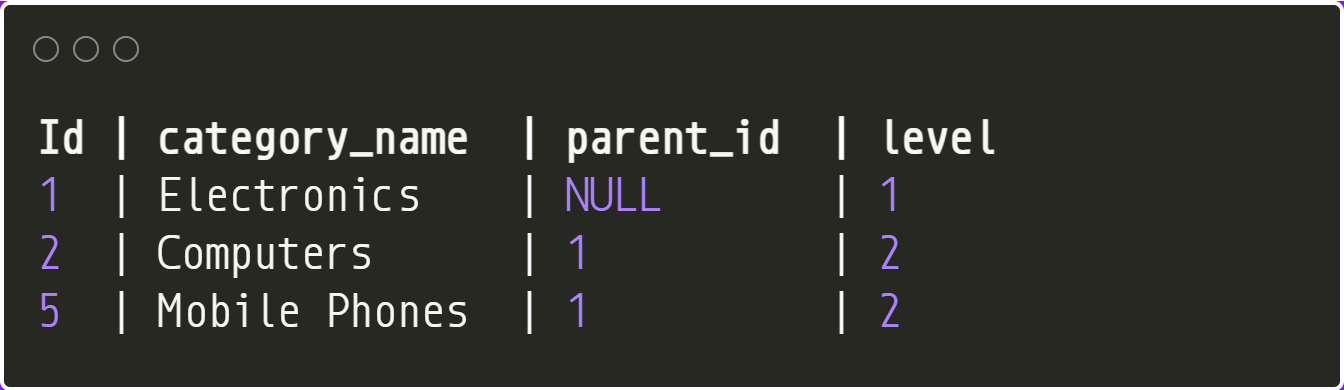
For the second recursive step, the query looks for the next rows in the accessories table where parent_id matches ph.id (e.g., parent_id = 2). It finds subcategories of computers (ph.id = 2):
Laptops (id = 3, parent_id = 2)
Desktops (id = 4, parent_id = 2)
It joins these with product_hierarchy and sets the level to ph.level + 1 (2 + 1 = 3) since computers are level 2. Here is the table after this step:
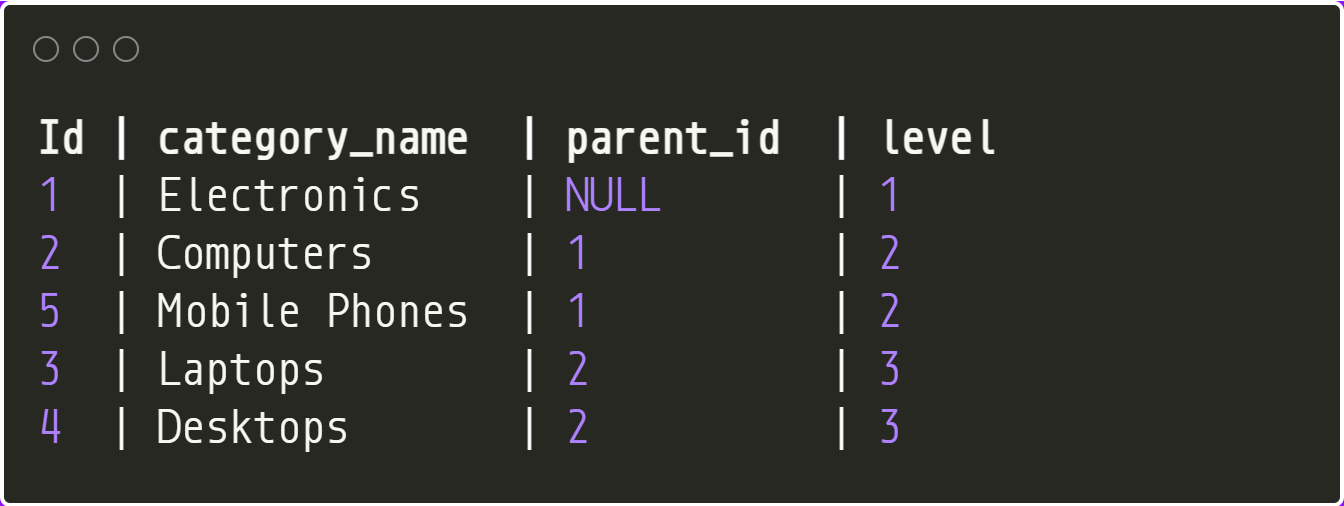
The third recursive step looks for the next rows in the accessories table where parent_id = 5. It finds a subcategory of “Mobile Phones”:
Accessories (id = 6, parent_id = 5)
Since mobile phones are at level 2, accessories are assigned level 3 (2 + 1 = 3). Results after this step:
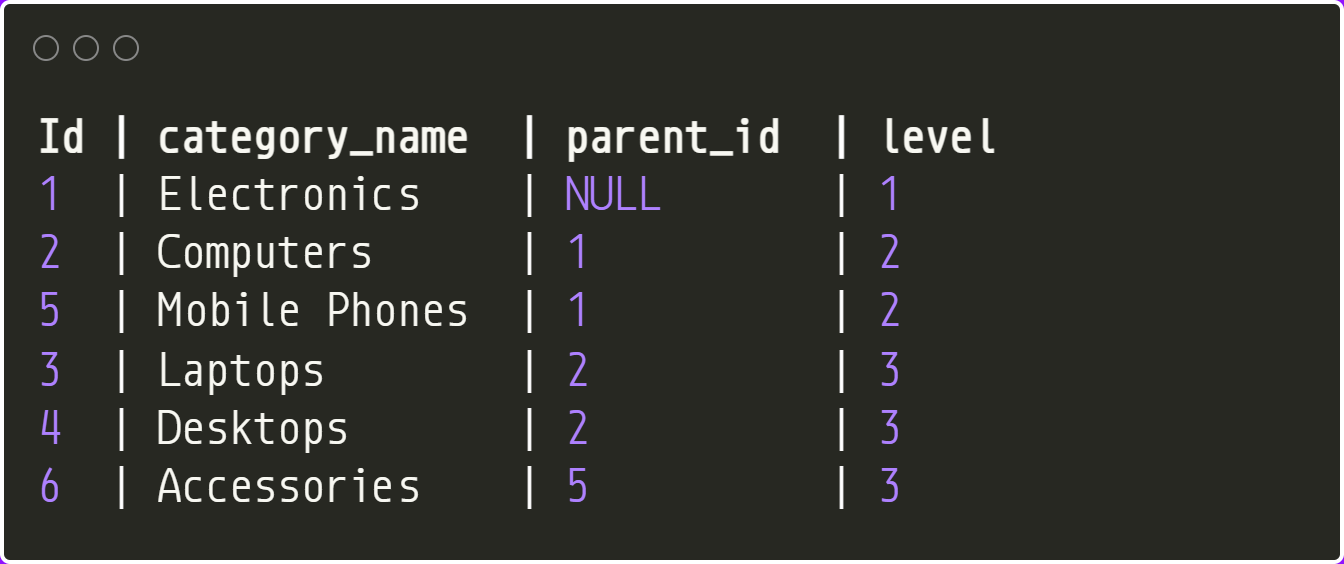
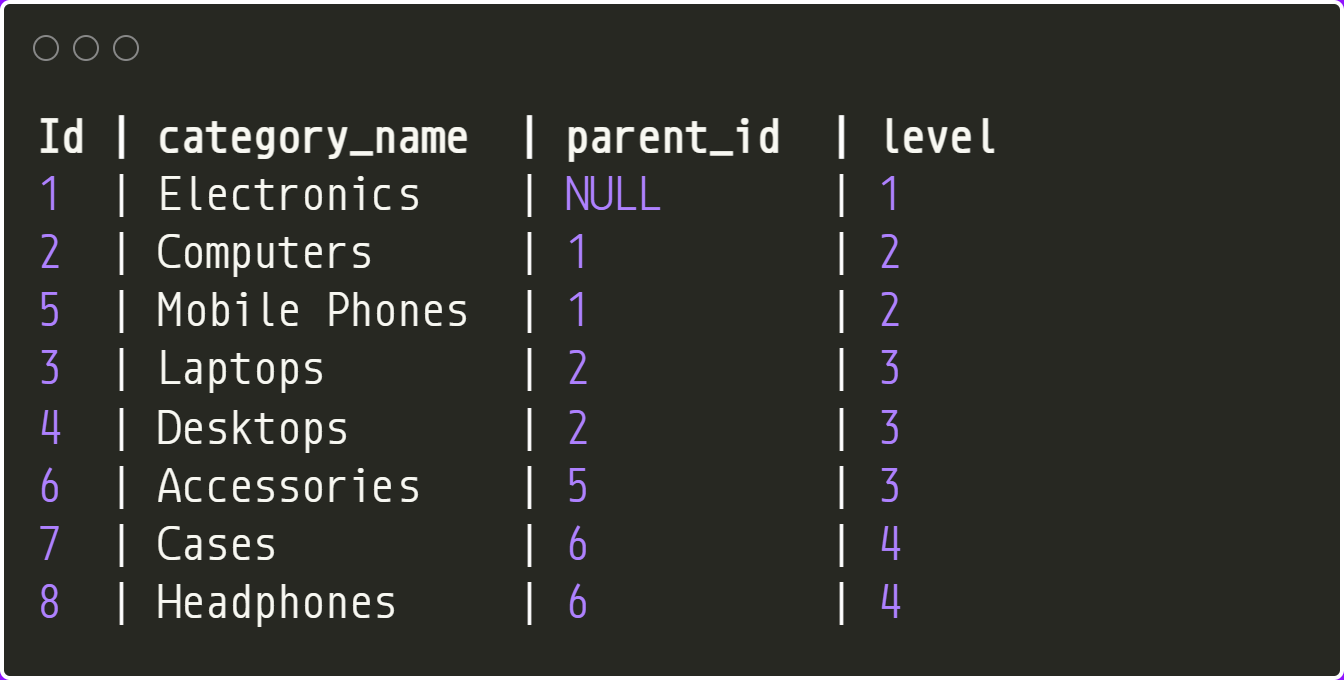
The fourth recursive step looks for the next rows in the accessories table where parent_id matches ph.id (e.g., parent_id = 6). It finds two subcategories of accessories (ph.id = 6):
Cases (id = 7, parent_id = 6)
Headphones (id = 8, parent_id = 6)
It joins these with the table and sets the level to ph.level + 1 (3 + 1 = 4), which is the level of accessories, which is 3 plus 1. Here is the table after this final step:
Wrap-Up
We have only scratched the surface of what recursive queries can accomplish. In most cases, they are used to solve complex analytical problems involving hierarchical data, such as calculating total sales for a manager and their subordinates, finding all descendants of a particular product category, or identifying all possible paths between two points in a network.
At first, recursive queries might seem intimidating, but like any skill, they become easier with practice. The best approach is to start with simple examples and gradually progress to more complex queries. Don’t be afraid to explore recursive queries. Understanding their structure and capabilities can significantly enhance your data analysis skills. Thanks for reading!