
How to Use Callback Functions in Python: A Step-by-Step Tutorial

Have you ever heard of a callback function in Python?
Let me explain what it means. Imagine you visit a doctor’s office. There is a queue, so you are assigned a number. Instead of waiting at the doctor’s door, you continue with your day. When the doctor is ready, they call your number, and you know it is your turn to be attended to.
That is essentially how callback functions work. A callback function is a function that is passed as an argument to another function and is called later when the other function decides it is time to execute it. The function receiving the callback is responsible for deciding when and how the callback should be used.
Callback functions are not special types of functions. They are simply regular functions used in a particular pattern. They are possible in Python because Python treats functions as objects, meaning they can be assigned to variables, passed as arguments, and returned from other functions just like any other value. In other words, a function can be passed to another function as an argument. Here is an example:
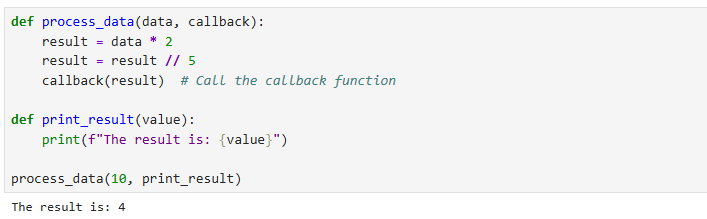
In this example, process_data accepts two arguments: data and callback. The callback argument is expected to be a function. When we call process_data(10, print_result), we pass the print_result function itself (without parentheses) as the callback. Inside process_data, the data is processed by first doubling it and then dividing it by 5 using integer division. After the processing is complete, process_data calls the callback function. Since “callback” refers to print_result, this is equivalent to writing:
print_result(result)
As a result, print_result receives the value 4 and displays it.
Here, the process_data function is focused on processing data. It does not concern itself with how the data will be displayed. This responsibility is delegated to the callback function (print_result).
The Python Mastery Bundle
Are you serious about learning Python in 2026? Master Python from the ground up with a hands-on learning bundle designed for beginners who want more than just theory. This bundle combines three practical Python books that help you build strong fundamentals, write cleaner code, and develop real problem-solving skills through consistent practice.
Using Callback in Error Handling
One practical way you can use callback functions is in error handling. If something goes wrong, your program can call a callback function to display an error message, log the error, or even retry the operation. By passing an error-handling callback to a function, you allow the caller to decide how errors should be handled without changing the function’s internal logic. Here is an example:
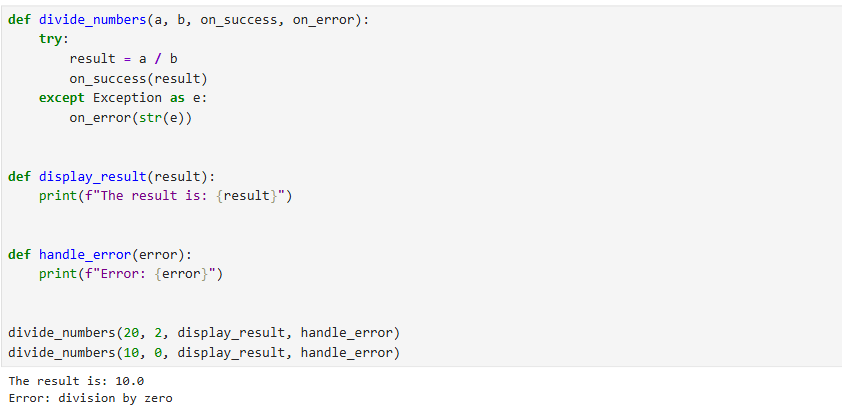
Here, we have a function that takes two functions as arguments. These are callback functions. The display_result function is called when there is no ZeroDivisionError in the code. The handle_error function is used to handle errors gracefully. This allows divide_numbers to focus only on performing the calculation while allowing the caller to decide how to handle success and errors.
Weather API Integration
When working with APIs, callback functions can come in handy because they allow you to separate the process of retrieving data from what you want to do with that data afterward. For example, when fetching weather information from an API, the function responsible for making the request should not need to know whether the data will be displayed to the user, saved to a file, stored in a database, or processed in another way.
Instead of creating a separate function for every possible use case, you can pass a callback function that will be executed once the API response is received. The API function focuses only on fetching and preparing the data, while the callback handles the next step. This makes your code more flexible and reusable because the same weather-fetching function can support different behaviors simply by passing a different callback function. Here is an example:
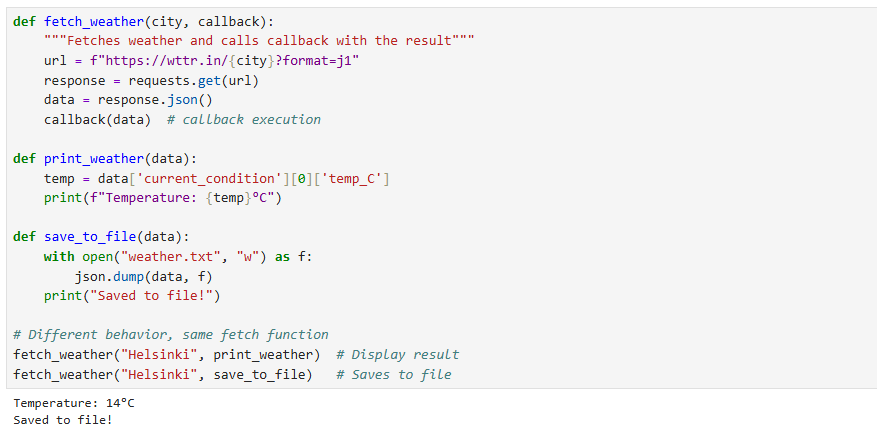
This example demonstrates the core principle of callbacks: a function can receive another function as an argument and execute it when a specific task is complete. The fetch_weather function is responsible only for fetching the weather data. It does not know or care what should happen after the data is retrieved. Instead, it accepts a callback function and calls it with the weather data once the request is complete. This allows other parts of the program to decide what to do with the result.
What makes this approach powerful is the separation of responsibilities and flexibility it provides. The same fetch_weather function can support completely different behaviors without any changes to its code. In one case, the callback displays the temperature using print_weather; in another, it saves the data to a file using save_to_file. Instead of creating multiple functions for fetching and displaying, fetching and saving, or fetching and processing data, we create one reusable function and customize its behavior by passing different callbacks. This pattern is widely used in real-world programming for handling events, processing data, and managing asynchronous operations.
Callback Functions with Built-in Functions
So far, we have concentrated on using callback functions with user-defined functions. However, callback functions can also be used with built-in functions. In Python, many built-in functions accept another function as an argument. This allows you to customize how the built-in function behaves without having to rewrite its internal logic.
Using sorted() with a Callback
A common example is the sorted() function. By default, sorted() arranges items in ascending order. However, it also accepts a key argument, which allows you to provide a callback function that determines how items should be compared during sorting. For example, suppose we have a list of words and want to sort them based on their length:
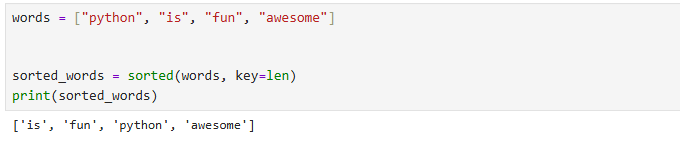
Here, len is a built-in function that is passed as a callback to sorted(). Instead of comparing the words directly, sorted() calls len() on each word and uses the returned values to determine the order. The key parameter expects a callback function. sorted() calls this function once per item and sorts based on the returned values.
Using map() with a Callback
Another example is using map() with built-in functions:

The map() function takes two arguments: a function and an iterable. It calls the function on every item in the iterable. In this example, int is passed as the callback function, converting each string into an integer.
When no built-in function fits your needs, you can also use lambda functions as callbacks:

The key idea is that a callback does not have to be a function that you create yourself. Any function that matches the expected behavior can be passed as a callback, including Python’s built-in functions and lambda expressions.
Using built-in functions as callbacks is powerful because it:
Reduces boilerplate code, as there is no need to write wrapper functions
Improves readability – for example, key=len is immediately clear
Leverages Python’s ecosystem – built-in functions are optimized and tested
With this approach we can reuse Python’s existing functionality while taking advantage of higher-order programming patterns. Instead of writing extra code, we can pass existing functions directly and let Python handle when and how they are executed.
Limitations of Callback Functions and Precautions to Take
Callback functions are like salt, great for a meal but not for every meal. One of the biggest challenges is that code can become difficult to read and maintain when too many callbacks are nested inside one another. This problem, often called callback hell, happens when multiple asynchronous operations depend on the results of previous operations, leading to deeply nested and complicated code structures.
Callbacks can also make error handling more difficult, especially when different callbacks handle different parts of a process. As the number of callbacks grows, it can become harder to track the flow of execution and understand which function is called and when.
To avoid these problems, callbacks should be kept simple and focused. Each callback should have a clear responsibility, and complex workflows should be broken into smaller functions.
In modern Python, tools like async/await (which we won’t cover here) can often provide cleaner solutions for handling complex asynchronous tasks. However, callbacks remain an important concept because many Python libraries and frameworks use them to allow developers to customize behavior and respond to events.