
Common Python Code Mistakes Every Beginner Makes

Python is an interesting language. Ironically, just because it is easy to understand makes it easy to get wrong or misunderstand some concepts. I cannot count how many times I have been caught with code that ran without throwing an error but gave a completely baffling result.
We assume that if code looks simple, what Python is doing under the hood must also be simple. But Python hides a lot of complex plumbing to keep that surface looking clean. Because the code reads almost like English, it lures us into applying human logic to a machine environment.
Let’s look at some of the most common mistakes beginners make when they get caught under the spell of “Python looks easy” and, more importantly, how you can avoid them.
The Python Mastery Bundle
Master Python from the ground up with a hands-on learning bundle designed for beginners who want more than just theory. This bundle combines three practical Python books that help you build strong fundamentals, write cleaner code, and develop real problem-solving skills through consistent practice.
1. Forgetting to Return Values from Functions
One of the most difficult things for beginners to understand is the difference between the print() function and the return statement in Python user-defined classes. Most beginners think that the return statement and the print() function are interchangeable. This is because both make things ‘appear’ on the screen. They think that when a function prints something, then it is returning the value. Here is an example:
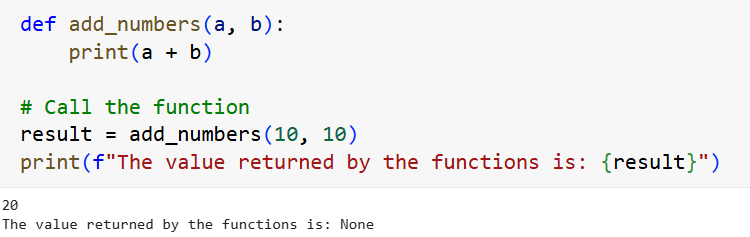
When we run add_numbers(10, 10), the function executed print(10 + 10), which displayed 20 on the screen. But if we check what value the function is returning, we get None. This is because there was no return statement, so the function automatically handed back a default value of None. So, the print() function prints something to the screen but does not return it. This means that we cannot use the sum of a + b outside the function because it has not been returned.
To ensure that the function returns a value that we can use in the future, we must explicitly add the return statement. See below:
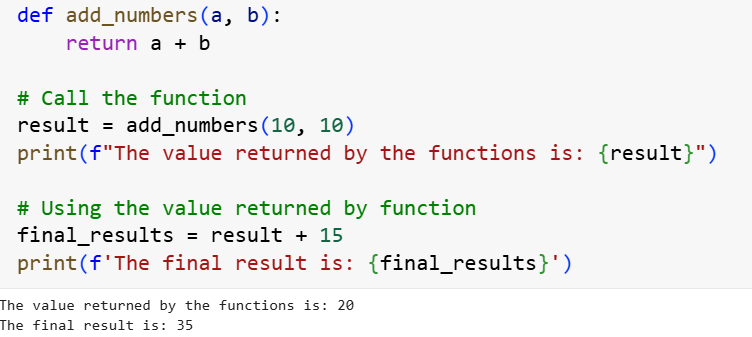
Now that we have used the return statement inside the function, we have returned the sum of a + b, which is 20. Because the value has been returned, we have used it outside the function by adding 15 to it to give us 35.
Important Tip: If you want to use the output of a function, then you must return it. If you just want to check what a variable looks like while debugging, use the print() statement.
2. Not Understanding References vs. Copies (Especially with Lists and Dicts)
This is another common beginner trap: not understanding the difference between a reference and a copy. When one list (or dict) is assigned to another variable, it does not create a copy of the original; it only creates another reference to the same object in memory. So when you modify the reference, you are basically modifying the original object.
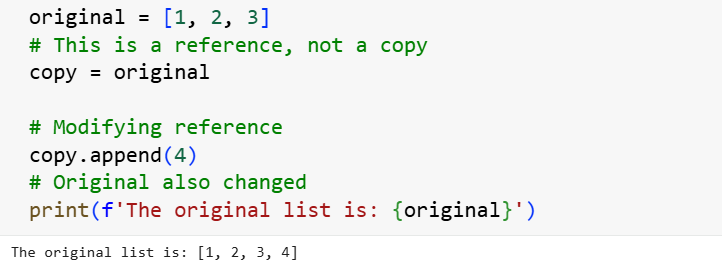
Notice here that even though we are appending a value to the reference, the original list has also been modified. The core of the issue is that in Python, variables are not containers that hold data; they are labels (or pointers) attached to the data. Because copy = original didn’t copy the data, it just copied the reference (the pointer) to the data. Both variables are now staring at the exact same spot in your computer’s memory.
If you want a completely independent duplicate that you can modify without affecting the original, you have to explicitly tell Python to make a copy.
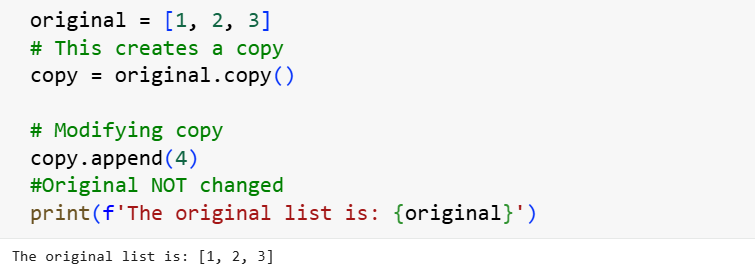
Because we have explicitly created a copy, modifying it (copy.append(4)) does not change the original list. It is important to note that the standard .copy() only copies the outer layer. If this was a nested list, changing the copy would still impact the original. See below:
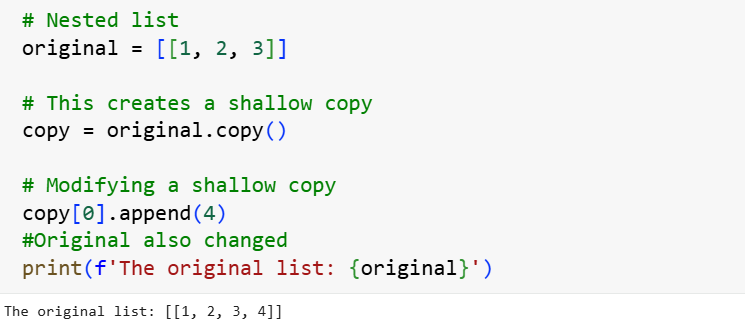
Here we created a copy using .copy(). However, when we tried to change the nested list of the copy, the original list also changed. This is because the copy created was for the outer layer and not the nested list. If we want to make a full copy of the nested list, then we must be explicitly about it. We must tell Python that we are creating a deep copy. This will sever all ties with the original list. See below:
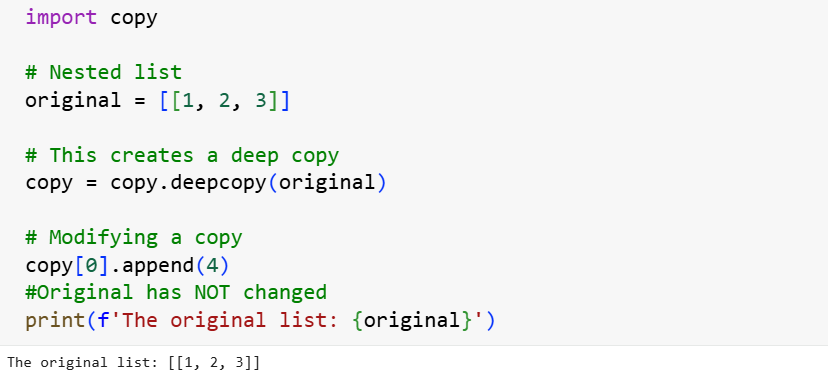
Did you see what has happened here? Changing the copy here has not impacted the original because we have severed all ties to the original by creating a deep copy using the copy module.
3. Confusing the ‘is’ Operator with the Equal-to Operator (==)
This is another common mistake that beginners make. It is easy to make this mistake because in certain instances, the two operators may appear to behave the same. In spoken English, “equal” and “is” mean the exact same thing. If I say, “That car is the same as my car,” you know what I mean. But in Python, == and “is” are looking at two entirely different things.
Here is the key difference between the two:
"==" checks for VALUE: “Are these two equal?” (Equality)
"is" checks for IDENTITY: “Are these two things literally the exact same object in computer memory?” (Same pointer/ID)
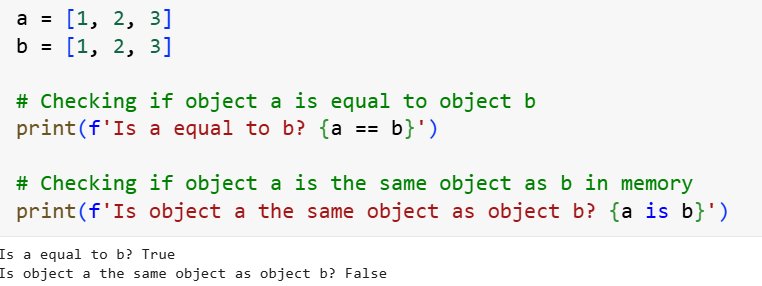
Here the first check using the equal-to operator (==) returns True, because lists a and b are equal (they have the same content). The second check returns False because objects a and b are not the same object in memory.
It is important to note that for small integers, to save memory and run faster, Python automatically optimizes small integers (usually -5 to 256) and short strings. It creates them once and reuses them. So when you type 100, Python points both a and b to the exact same pre-existing number 100 in its memory system. This means that both the equal-to operator and the is operator will return True. See below:
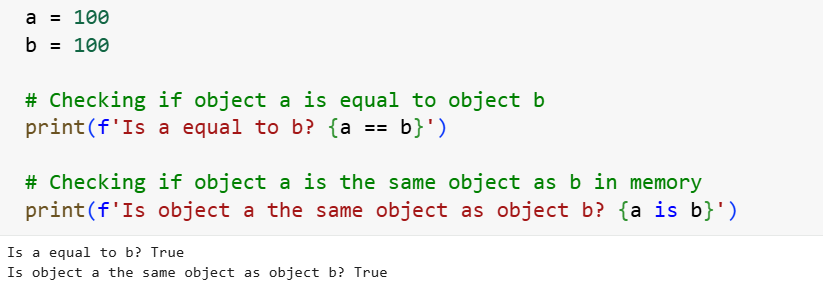
You see that we get True for both checks here. But you should never rely on this for logic. As soon as the numbers get bigger, or you use lists/dictionaries, this behavior stops.
Golden Rule: If you are checking for equality, always use the equal-to operator ( ==). If you are checking for identity, use the "is" operator.
Wrap-Up
A lot of the “gotchas” we covered here might feel frustrating, especially if you have recently fallen into one of these traps. It might even make you feel like you aren’t cut out for learning Python. However, it is crucial to understand that these mistakes are not a reflection of your ability or your learning habits; rather, they are a reflection of a language that isn’t always explicitly obvious about how it works under the hood.
This is also a great reminder for all of us that learning Python is a continuous journey, and we should treat it as such. We must always be open to learning new things and, more importantly, be willing to accept corrections when we discover that something we thought we understood actually works a little differently. Thanks for reading.
The Data Analyst Bootcamp Bundle (SQL + Python) 100 Hands-On Data Analysis Challenges
These are the best hands-on materials that teach how to use the important libraries in data analysis: pandas, Matplotlib, seaborn, NumPy, etc. You will also learn to write SQL queries by answering questions that data analysts face in the world, using real datasets. Get the bundle if you want real, practical learning.