
5 Popular SQL Interview Questions and How to Answer Them

“SQL is the language of data, but it’s the logic behind your queries that gets you the job.”– Anonymous
Walking into a data analyst interview? SQL is almost always on the menu. It’s the gatekeeper skill. Recruiters want to see if you can not only write queries but also think through real business problems with data. In 2025, with tools like AI-assisted querying on the rise, core SQL fundamentals remain unchanged: joins, aggregations, and window functions are still the bread and butter. But here’s the catch: many candidates stumble by rote-memorizing syntax without grasping the “why.” Interviewers aren’t testing trivia; they’re probing your ability to translate vague requests into clean, efficient code.
Drawing from recent trends in data analyst roles at tech giants and startups, these five questions pop up frequently. I’ll break each down: the question, why it’s asked, and a solid possible answer with sample code.
1. Find the Second-Highest Salary in the Table
The Question: Write a SQL query to find the second-highest salary from the employees table. What if there’s no second-highest?
Why It’s Asked: This question is asked because it reveals how well you understand core SQL thinking, not just syntax. Finding the second-highest salary forces you to deal with duplicates, ordering, filtering, and edge cases like “what if the value does not exist?” It shows whether you can reason about data, not just retrieve it. Interviewers also use it to see if you understand how SQL processes results step by step and whether you can write queries that are resilient instead of fragile. In short, it is a simple-looking problem that quickly exposes whether someone truly understands SQL fundamentals or is just memorizing queries.
How to Answer: Obviously, there are several ways to answer this question. The first step should be to determine the highest salary. The second step is to determine the highest value that is less than the highest or maximum value. Start by assuming a simple table: employees (id, name, salary). I would use a subquery to answer the question. Here is the solution:
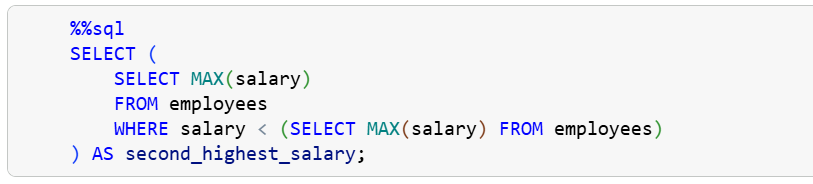
This approach also handles duplicates naturally. If multiple employees share the highest salary, the subquery still returns a single maximum value, and the outer query correctly finds the next distinct salary. There is no need for extra tricks or assumptions.
Most importantly, the subquery solution is robust. If there is no second-highest salary, the query safely returns NULL instead of breaking or producing misleading results. That shows interviewers that you think about edge cases and write defensive SQL.
SQL Essentials for Data Analysis is Now Available
Learn the #1 skill in data. If you’re tired of hopping between tutorials and want a clear, guided roadmap, this is the step that finally gets you unstuck. You can grab your copy today and start the 50-day journey.
SQL Essentials for Data Analysis: A 50-Day Hands-on Challenge Book (Go From Beginner to Pro). Gumroad 35% OFF.
Master Data Analysis with Python: 50 Days of Data Analysis with Python: The Ultimate Challenge Book for Beginners
2. Difference Between WHERE and HAVING
The Question: Explain the difference between WHERE and HAVING clauses. Provide an example where HAVING is necessary.
Why It’s Asked: Interviewers ask this question to check whether you understand how SQL actually works under the hood, not just whether you can write queries that happen to run. The key idea they are testing is SQL execution order. Many beginners treat WHERE and HAVING as interchangeable filters. This question quickly reveals whether you know that WHERE operates on raw rows before aggregation, while HAVING operates on grouped data after aggregation. It also shows whether you understand aggregate functions and GROUP BY, which are core skills for any data analyst role.
How to Answer: Start by clearly stating the difference. Explain that WHERE filters rows before grouping and cannot use aggregate functions, while HAVING filters groups after aggregation and is specifically designed to work with aggregates like COUNT, SUM, or AVG. Then give a concrete example where HAVING is required. For instance, explain that if you want to find customers whose total spending exceeds a certain amount, you must use HAVING because the total is calculated after grouping. Finish by reinforcing the rule of thumb: use WHERE to filter rows, and use HAVING to filter aggregated results.
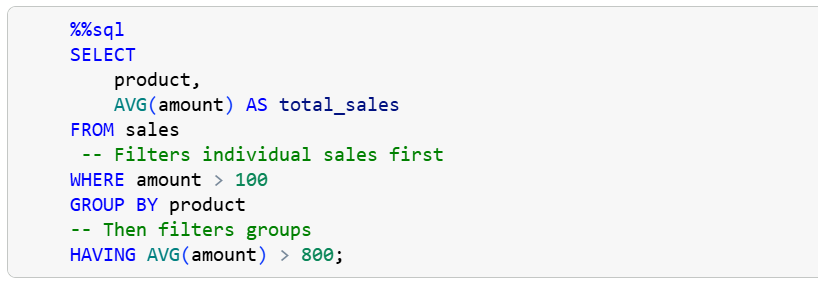
One of the most common pitfalls is trying to use aggregate functions in WHERE (syntax error). Confusing them in simple queries.
3. Join Two Tables: Customers and Orders
The Question: Given the customers and orders tables, write a query to find customers who haven’t placed any orders. Explain INNER vs. LEFT JOIN.
Why It’s Asked: Real data lives across tables, and joins power 90% of reports. This question tests whether you truly understand joins beyond memorizing syntax. Interviewers use it to see if you can reason about relationships between tables and, more importantly, how missing data behaves in SQL. This question reveals whether you understand how LEFT JOIN preserves rows, how NULL values appear when no match exists, and how to correctly identify the absence of data. These are everyday skills for real data analysis, especially when working with incomplete or messy datasets.
How to Answer: Start by explaining the join difference clearly. An INNER JOIN returns only rows where there is a match in both tables. A LEFT JOIN returns all rows from the left table and matches from the right table, filling in NULL where no match exists.
Next, show how to use that behavior to solve the problem. To find customers who have not placed any orders, you must use a LEFT JOIN from customers to orders and then filter for rows where the order is NULL.
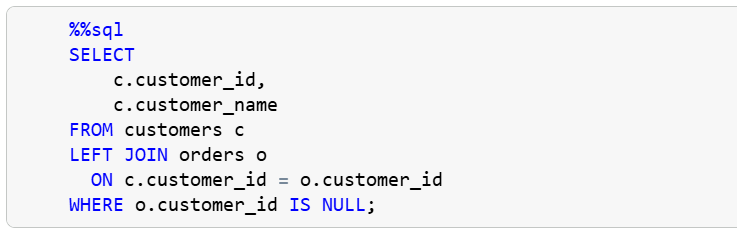
The most important thing is to explain why this works. The LEFT JOIN keeps all customers. For customers without orders, the columns from the orders table become NULL. Filtering on NULL isolates exactly those customers. You can then briefly add why an INNER JOIN would fail here. An INNER JOIN would remove customers without orders entirely, making it impossible to find them.
4. Use Window Functions to Rank Sales by Region
The Question: “Using window functions, rank products by sales within each region. What’s the difference between ROW_NUMBER and RANK?”
Why It’s Asked: Window functions are heavily used in real analytics work for rankings, comparisons, and trends without collapsing data. This question checks whether you understand analytical thinking in SQL, not just basic aggregation. Interviewers ask this to see if you know how to partition data correctly and whether you understand how SQL handles ties. Many candidates can write a ranking query, but far fewer can explain why the results look the way they do when values are equal.
How to Answer: Start by showing how to rank products by sales within each region using each window function. The key idea is to use PARTITION BY to reset the ranking per region and ORDER BY to define how the ranking is calculated. See below:
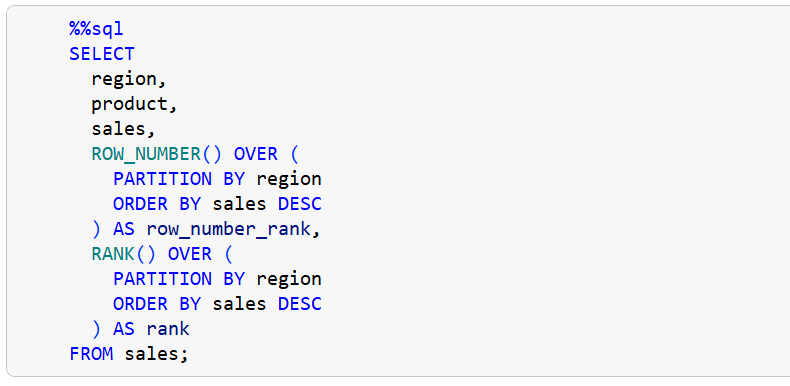
Then explain the difference between ROW_NUMBER and RANK.
ROW_NUMBER assigns a unique number to each row, even when two products have the same sales. There are no ties. If two products have equal sales, one will still be ranked higher than the other based on internal ordering.
RANK assigns the same rank to rows with equal values, but it leaves gaps in the ranking sequence.
You can also explain when to use each one. Use ROW_NUMBER when you need a strict ordering with no ties, such as picking a single top product per region. Use RANK when ties matter, and you want equal values to share the same position.
5. Identify Duplicates in a Table
The Question: "How would you find and remove duplicate rows in a table based on email? Assume no unique ID."
Why It’s Asked: In real data, duplicates are extremely common, especially when there is no unique ID. Interviewers want to see if you can reason about identifying duplicates using business logic (in this case, email) and whether you understand how SQL actually decides which rows to keep or remove. It also tests your knowledge of window functions or subqueries and your awareness that deleting data is irreversible and must be done carefully.
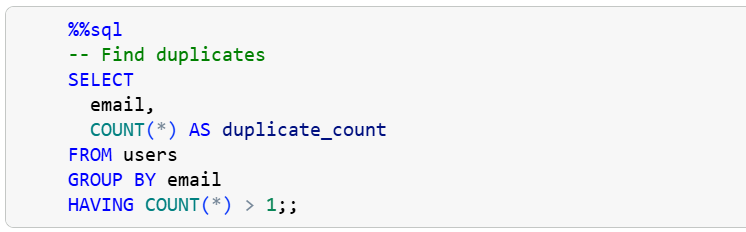
How to Answer: Since there is no unique ID, the safest approach is to first identify duplicates, then decide which row to keep, and only then remove the rest. Here is the query:
To drop the duplicate, you can use a subquery:
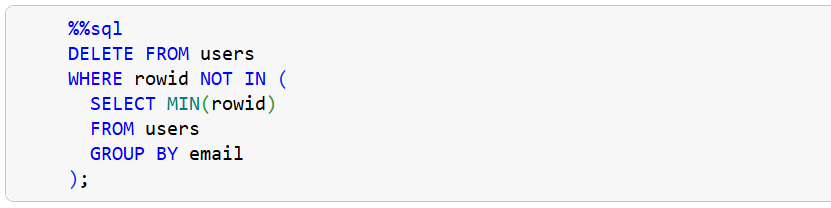
Here, the rowid is a system-generated identifier available in databases like SQLite. The subquery keeps the smallest rowid for each email. All other rows with the same email are deleted. This approach works even when the table has no explicit primary key.
Please note that there are multiple ways that you can answer this question.
Wrap-Up
These five SQL questions are not random. They mirror the daily grind of data analysis: ranking insights, cleaning chaos, and joining messy realities. To nail them, focus on logic over syntax. Explain your thought process, handle edge cases, and always connect your solution back to business value. Understanding alone, however, is not enough. Passive reading creates trivia champions, not problem solvers.
To truly ace interviews, you have to practice actively. That is why I created a resource (SQL Essentials for Data Analysis: A 50-Day Hands-on Challenge Book (Go From Beginner to Pro)) designed to help you do more than just answer interview questions. It helps you master SQL for the real work that data analysts actually perform. Master these fundamentals, and you will walk out with offers, not just handshakes.
Thanks for reading. Now go query something messy and make it shine.
Thanks for sharing. 🙏🏽